Docs directory
Hover Quotes & Popup
Quotes right next to your cursor - terminal stays closed.
The popup is Camovia Tray's everyday surface: hover the tray icon and it appears, move away and it hides - all without opening the MT5/MT4 main window.
Hover to pop up
By default, hovering the tray icon pops up the panel instantly; it hides when the mouse moves away. The popup has two tabs: "Quotes" and "Positions".
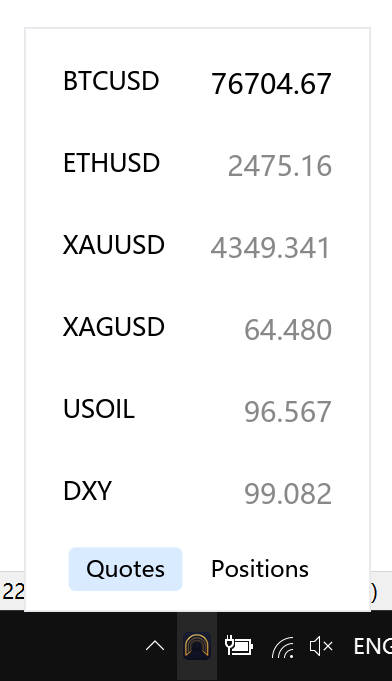
The Quotes tab
The Quotes tab lists your selected symbols with their latest prices. Data comes live from your local MT5/MT4 terminal - it never passes through a third-party server.
Manage your watchlist
- 1 Open Settings → Data Source and find the symbol list
- 2 Check the symbols you care about; the popup updates instantly
- 3 After switching data sources (MT5 ↔ MT4), the app automatically removes symbols that don't exist on the current terminal and tells you how many were kept
Demo data before activation
When your subscription isn't activated or the terminal isn't connected yet, the popup shows demo data: simulated quotes and simulated positions (with randomly changing P&L). It doesn't represent real market data.
Once you activate and connect a terminal, the popup switches to real data automatically.
Related
Not installed yet?
Download Camovia Tray free — 2-day trial, subscriptions from $2.49/month.